
Server-Side vs Client-Side Tracking: What SaaS Teams Must Know
Client-side tracking is costing SaaS teams critical data. Learn how server-side tracking works, why it wins on accuracy, and what your team needs to make the switch.
Introduction
If your SaaS tracking infrastructure still relies entirely on browser-based scripts, you are almost certainly making decisions on incomplete data. Ad blockers now affect upwards of 30% of web traffic, Safari's Intelligent Tracking Prevention caps cookie lifetimes at seven days, and every major browser vendor is tightening the screws on third-party data collection. For B2B SaaS teams, the gap between what actually happened and what your analytics dashboard reports is widening every quarter. The real question is no longer whether server-side tracking is worth the engineering investment; it is whether you can afford the cost of not making the switch.

Why Client-Side Tracking Is Breaking Down
Client-side tracking was designed for a web that no longer exists. It assumed browsers would execute JavaScript reliably, that cookies would persist for months, and that no intermediary would interfere with the data pipeline. Every one of those assumptions has been systematically dismantled over the past five years.
The Ad Blocker and Browser Privacy Problem
The scale of data loss from client-side scripts is staggering and growing. Most SaaS teams underestimate how much of their funnel goes unrecorded because the tracking calls simply never fire. Here are the primary failure points:
Ad blockers: Extensions like uBlock Origin and Brave's built-in shields block tracking scripts before they execute, silently deleting conversion events from your data
ITP and cookie restrictions: Apple's Safari ITP caps first-party cookies set via JavaScript to 7 days, meaning returning users look like new visitors in your analytics
Consent banner abandonment: Users who dismiss or ignore cookie banners generate zero tracking data under strict consent implementations, creating systematic bias in your dataset
Script loading failures: Network latency, browser crashes, and race conditions cause client-side tags to fire out of order, duplicate events, or fail silently
The Hidden Cost of Inaccurate Data
When your client-side tracking loses data to ad blockers, the damage goes far beyond a dip in pageview counts. Attribution models trained on incomplete conversion data systematically overvalue the channels and touchpoints where tracking happens to survive, while undervaluing the ones where technically sophisticated users (often your highest-value prospects in B2B) block scripts entirely. Growth teams then double down on the wrong channels, product teams misread feature adoption, and executive dashboards tell a story that diverges further from reality every month.
How Server-Side Tracking Works and Why It Wins
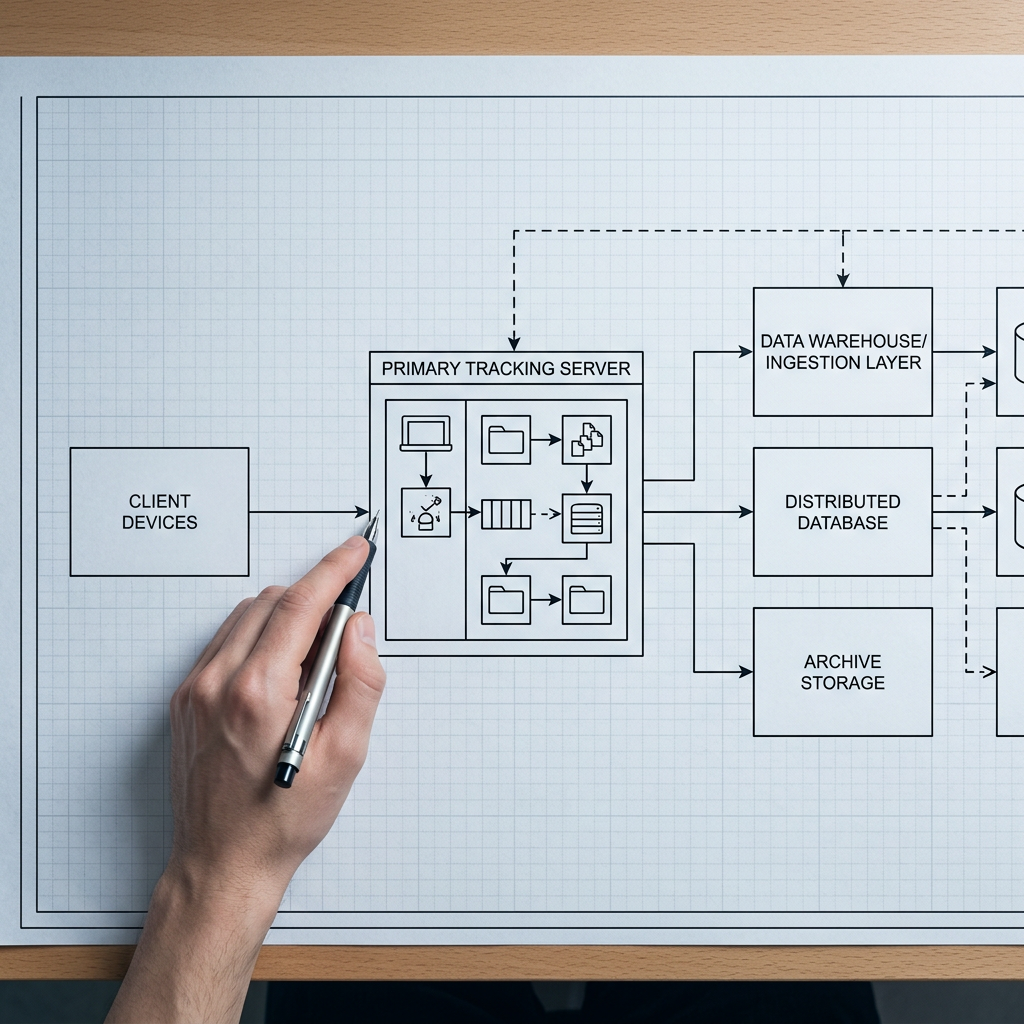
Server-side tracking moves the data collection layer from the user's browser to your own backend infrastructure. Instead of relying on JavaScript tags that fire in an uncontrolled environment, events are captured at the server level, processed on infrastructure you control, and forwarded to analytics destinations through server-to-server API calls. This architectural shift eliminates the entire class of problems created by browser restrictions, ad blockers, and unreliable network conditions.
Architecture and Data Flow
In a typical server-side implementation, user interactions hit your application server, which logs the event directly. That event is then routed, either through a real-time event streaming pipeline like Kafka or through a server-side tag manager, to your analytics platforms, ad networks, and data warehouse. The browser never needs to load a third-party script, and no client-side JavaScript needs to execute for the event to be recorded.
This is fundamentally different from the client-side model, where a user's browser must download, parse, and execute tracking scripts from multiple vendors, each of which can be blocked, delayed, or modified by extensions and browser policies. With server-side tracking, your data pipeline is as reliable as your own infrastructure. If your application server processes a request, the corresponding event gets tracked. Understanding how this data flow operates at the protocol level is essential before choosing tools or vendors.
The Accuracy and Privacy Compliance Advantage
Server-side tracking accuracy is not a marginal improvement. Teams that migrate from purely client-side setups consistently report recovering 20% to 40% of previously lost events. That is not an optimization; it is a fundamental correction to a broken data foundation. For enterprise SaaS companies running multi-touch attribution models, that recovered data changes which campaigns get budget and which features get prioritized on the roadmap.
Privacy compliance becomes structurally simpler as well. When events route through your server, you have a single enforcement point for consent logic, data minimization, and PII redaction. Instead of trusting that every client-side tag respects a user's consent preference (a trust that is routinely broken by misconfigured tag managers), your server applies the rules once before any data leaves your infrastructure. This is a significant advantage for teams navigating GDPR, CCPA, and evolving global privacy frameworks. Server-side tracking and first-party data collection go hand in hand: you control what gets collected, where it is stored, and exactly which downstream systems receive it.

Implementation Realities and Trade-Offs
Server-side tracking is not a drop-in replacement. It requires engineering investment, careful planning around event taxonomy, and a clear understanding of where the trade-offs lie. Here is what teams need to consider before committing.
What the Implementation Actually Involves
Server-side tracking implementation for a typical B2B SaaS product starts with instrumenting your backend to emit structured events. This usually means adding event calls to your API layer or application controllers, defining a consistent schema, and routing those events to a collector endpoint. From there, you need infrastructure to process and forward events to downstream destinations like Google Ads, Meta's Conversions API, your data warehouse, or tools like Mixpanel and Amplitude.
Google Tag Manager's server-side container is one common starting point; it lets teams run a tagging server on their own cloud infrastructure (typically Google Cloud Run or App Engine) and proxy tracking requests through a first-party domain. Segment and warehouse-native CDP alternatives offer similar server-side event routing, often with pre-built integrations that reduce the engineering surface area. The key decision is whether to build a custom pipeline, adopt a managed platform, or use a hybrid approach. For most SaaS teams, starting with a managed tool and migrating to a custom pipeline as requirements grow is the pragmatic path. Server-side tagging with GTM is a well-documented entry point for teams already in the Google ecosystem.
Where Client-Side Tracking Still Has a Role
A fully server-side approach is not always the right answer. Certain types of behavioral data, like scroll depth, mouse movement heatmaps, and in-page interaction patterns, are inherently client-side events. These cannot be observed from the server because they happen entirely within the browser DOM. Similarly, A/B testing tools that manipulate the UI in real time require client-side JavaScript to function.
The best SaaS tracking setups are hybrid. Core conversion events, signups, purchases, feature activations, and subscription changes should flow through server-side tracking infrastructure for maximum reliability. Supplementary behavioral analytics can continue to run client-side, with the understanding that this data will be incomplete by nature. The important thing is to stop relying on client-side scripts for the events that drive business decisions. When identity resolution and accurate attribution are at stake, your critical events should never depend on the user's browser cooperating.
Conclusion
The shift from client-side to server-side tracking is not a trend; it is a structural correction for a data pipeline that has been degrading for years. SaaS teams that make the move recover lost events, build more reliable attribution, and simplify privacy compliance in a single architectural change. The implementation requires real engineering effort, but the alternative is continuing to make product and growth decisions on data you already know is incomplete. TrackRaptor covers the full depth of these infrastructure decisions, from event streaming architectures to tracking protocol comparisons, so teams can move from understanding the problem to solving it.
Explore TrackRaptor's SaaS tracking resources for deep-dive guides on building reliable tracking infrastructure.
Frequently Asked Questions (FAQs)
What is server-side tracking?
Server-side tracking is a data collection method where events are captured and processed on your backend server rather than in the user's browser, then forwarded to analytics platforms via server-to-server API calls.
Why use server-side tracking for SaaS?
SaaS teams use server-side tracking because it recovers 20% to 40% of events typically lost to ad blockers and browser restrictions, providing the accurate data foundation needed for reliable attribution and product analytics.
Can server-side tracking prevent ad blockers from affecting data?
Yes, because server-side tracking processes events on your own infrastructure and never loads third-party scripts in the browser, ad blockers have no opportunity to intercept or block the tracking calls.
How does server-side tracking improve data accuracy?
Server-side tracking improves data accuracy by eliminating browser-level interference, ensuring events fire reliably regardless of client-side conditions like script failures, consent banner dismissals, or cookie expiration policies.
Can server-side tracking replace pixel-based tracking entirely?
Server-side tracking can replace pixel-based tracking for conversion events and core analytics, but client-side scripts are still needed for browser-specific behavioural data like scroll depth, heatmaps, and real-time UI experiments.