
Server-Side Tracking Setup to Stop Ad Blocker Data Loss
Learn how to implement server-side tracking to stop ad blocker data loss. Compare tools, review setup steps, and protect your SaaS analytics pipeline.
Introduction
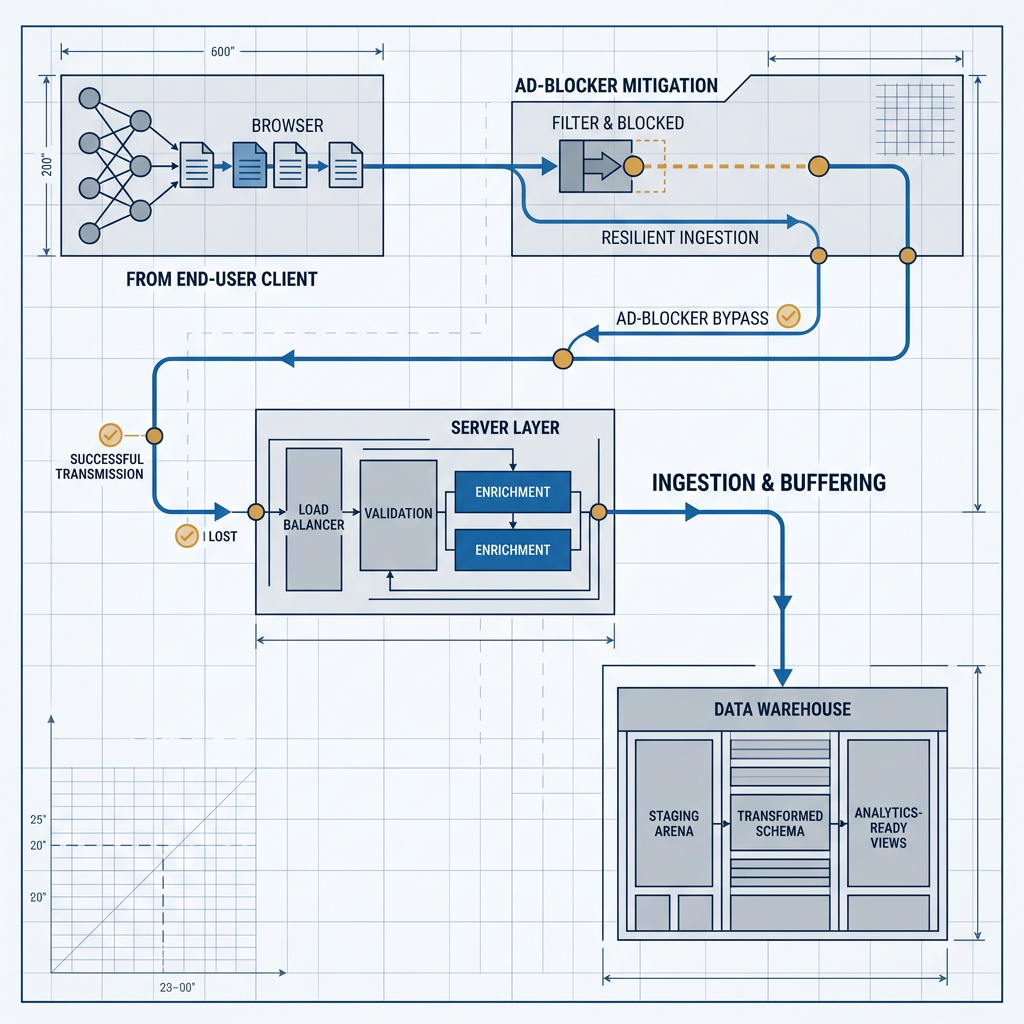
Ad blockers now intercept 30 to 40 percent of browser-based tracking scripts before a single event reaches your data warehouse, and that percentage climbs every quarter. If your SaaS team still relies exclusively on client-side JavaScript tags for analytics, your conversion funnels, attribution models, and product usage metrics are built on incomplete data. Server-side tracking moves event collection off the browser entirely, routing it through infrastructure you control so that browser-level ad blocking never touches your pipeline. The architecture is not conceptually complex, but the implementation details, from API event routing to validation, determine whether you actually recover that lost data or just shift the problem.

Why Client-Side Tracking Is Structurally Broken
The core problem with client-side tracking is architectural, not incidental. Every JavaScript tag injected into a browser page runs in an environment the user controls, and ad blockers exploit that control aggressively. Understanding the failure mode helps you design around it rather than patch over it.
How Ad Blockers Intercept Your Data
Ad blockers operate by matching network requests and DOM elements against filter lists such as EasyList and EasyPrivacy. Any outbound request to a known analytics domain (think google-analytics.com, cdn.segment.com, or api.mixpanel.com) gets silently dropped before the HTTP connection is established. The result is not a degraded signal; it is a completely absent one for every user running one of these extensions.
Request blocking: Outbound HTTP calls to analytics endpoints are cancelled at the browser network layer
Script injection blocking: JavaScript files from known tracking domains are prevented from loading entirely
DOM mutation filtering: Some blockers remove tracking pixels and hidden iframes after page render
Cookie restriction: Third-party cookies are stripped or sandboxed, breaking cross-domain identity resolution
The Downstream Cost to SaaS Teams
When 30 per cent or more of your events never arrive, every downstream metric is compromised. Funnel conversion rates skew high because you lose top-of-funnel visitors disproportionately (technical users who install ad blockers are often your highest-value segment). Attribution models misallocate spend because touchpoints disappear from the journey. Product teams make roadmap decisions based on incomplete usage data, and growth operators optimize campaigns against phantom baselines.

Server-Side Tracking Architecture and Implementation
First-party server-side tracking works by collecting events on your own backend (or a proxy you control) and forwarding them to analytics destinations via API. Because the browser never makes a direct request to a third-party analytics domain, ad blockers have nothing to intercept. The event flows from user action to your server to the analytics endpoint, entirely outside the browser's filtering layer.
Choosing Your Stack and Routing Events
The server-side tracking implementation path depends heavily on your current infrastructure. If you already use a CDP like Segment or a product analytics tool like PostHog, both offer server-side SDKs and API endpoints that accept events directly from your backend. Segment's HTTP Tracking API and PostHog's capture endpoint both accept standard event payloads over HTTPS, which means your application server fires events at the moment of action (signup, feature usage, purchase) rather than relying on a browser tag to do it.
For teams not on a CDP, the pattern is straightforward. Your application backend captures the event at the point of business logic execution. A lightweight service (or even a route handler in your existing API) formats the event payload and sends it to your analytics destination's server-side tracking API. Google Analytics 4's Measurement Protocol, Mixpanel's Import API, and Amplitude's HTTP V2 API all accept server-originated events. The key architectural decision is whether to send events synchronously (in-line with the request) or asynchronously (via a queue like Kafka or RabbitMQ). Asynchronous routing is almost always the right call for production systems because it decouples event delivery from user-facing latency. Teams already running real-time event streaming with Kafka can pipe analytics events through the same infrastructure.
Validation, Debugging, and Maintaining Data Continuity
The most common failure in server-side tracking setups is not the architecture itself but the validation layer. When events originate from the browser, you can inspect them in browser DevTools. When they originate from your server, you need a different debugging workflow. Set up a staging pipeline that mirrors production but routes events to a test analytics property. Log every outbound event payload to a structured log (JSON format, including timestamp, event name, user ID, and all properties) so you can diff what your server sent against what your analytics tool received.
Maintaining data continuity during migration is critical. Running server-side and client-side tracking in parallel for two to four weeks gives you a comparison window to identify discrepancies. Expect server-side event counts to be higher, particularly for technical user segments. Use that delta as your baseline for quantifying ad blocker data loss prevention gains. An automated data audit pipeline that compares event volumes across both collection methods daily will surface issues before they compound.
One often-overlooked detail: server-side events lack the automatic context that client-side SDKs attach, such as user agent, referrer, screen resolution, and UTM parameters. You need to explicitly capture and forward these from the initial page request. Pass them as properties on the server-side event payload, or store them in your session layer and attach them at event dispatch time. Without this step, your identity resolution and attribution reporting will degrade even as your raw event counts improve.
Compliance, Tool Selection, and Best Practices
Moving to server-side event tracking does not exempt you from privacy regulations, and in some cases, it increases your obligations. It also opens up new decisions about tooling and long-term architecture that are worth getting right the first time.
GDPR, CCPA, and Server-Side Compliance
Server-side tracking is sometimes positioned as a way to "bypass" consent requirements. This framing is wrong and dangerous. Under GDPR in Europe, the legal basis for processing personal data does not change based on the collection mechanism. If you are tracking user behavior, you still need a valid legal basis (typically consent or legitimate interest), and you still need to honor opt-out requests. The difference is operational: with server-side tracking, consent enforcement happens in your application code rather than in a browser-based consent management platform. Your backend checks the user's consent state before dispatching the event. GDPR compliance for server-side tracking requires the same data subject rights workflows, just triggered at a different layer.
CCPA compliance follows a similar pattern. California's framework requires honoring "Do Not Sell" signals and deletion requests. Server-side collection makes this mechanically simpler because you have a single dispatch point where you can gate events based on user preferences, rather than relying on multiple browser tags to each respect a consent flag independently. Build consent checks into your event dispatch function as a hard gate, not an afterthought.
Selecting the Right Tools for Your Stack
The best server-side tracking tools for your team depend on what you already run. For teams using Segment, its server-side libraries (Node.js, Python, Go, Ruby) are the lowest-friction path. PostHog offers a self-hosted option that gives you full data residency control, which matters for regulated industries. When evaluating Segment vs PostHog or similar platforms, the deciding factors are typically data residency requirements, whether you need a warehouse-native CDP architecture, and how much of your analytics stack you want to self-manage.
For teams going custom, the implementation is a thin HTTP client that posts events to your analytics vendor's ingestion API. Wrap it in a retry layer with exponential backoff, add a dead-letter queue for failed events, and you have a production-grade pipeline. Pair it with a well-structured event taxonomy, and you avoid the "tracking everything, understanding nothing" trap that plagues many SaaS analytics stacks. TrackRaptor has covered the specific tradeoffs between custom events and standard events in depth, and those decisions become even more consequential when your collection layer is server-side because schema changes require a code deploy rather than a tag manager update.
Conclusion
Server-side tracking is not an optimization. It is a correction to a structurally broken collection model that silently discards data from your most technically sophisticated users. The implementation path, whether through a CDP's server-side SDK, a custom API client, or a proxy-based hybrid approach, requires deliberate work around context forwarding, consent gating, and validation pipelines. Get those details right, and you recover 30 per cent or more of previously invisible events, giving your growth and product teams a data foundation they can actually trust.
Explore TrackRaptor's full library of tracking and analytics deep-dives to build a data infrastructure that holds up under real-world conditions.
Frequently Asked Questions (FAQs)
How does server-side tracking prevent ad blocker data loss?
Server-side tracking routes events from your backend directly to analytics endpoints via API, so the browser never makes a request that ad blockers can intercept.
Can server-side tracking bypass ad blockers?
Yes, because events are sent server-to-server rather than from the browser, ad blocker filter lists have no network request to match against or block.
What is the difference between server-side and client-side tracking?
Client-side tracking relies on JavaScript tags executing in the user's browser, while server-side tracking collects and forwards events from your application server, removing the browser as a point of failure.
Is server-side tracking GDPR compliant in Europe?
Server-side tracking can be GDPR compliant, but it requires the same consent checks, data subject rights workflows, and lawful processing bases as any other data collection method.
How to migrate to server-side tracking?
Run both client-side and server-side collection in parallel for two to four weeks, compare event volumes to quantify the data gap, then phase out client-side tags once server-side coverage is validated.